Trekk › Guides › Teltonika FMC125
How to connect Teltonika FMC125 to Trekk
About 10 minutes. You can set it up by SMS, without a computer.
- 4G LTE Cat 1 and 2G
- RS232 and RS485 for LLS sensors
- 2 digital inputs
- 1 output
- 1-Wire
- Backup battery
What you need
- The tracker and a SIM card with mobile data
- A phone for SMS, or a Windows computer with Teltonika Configurator
- A Trekk account: 30 days free, up to 20 cars
Where to send data
- Server
tracker.trekk.io- Port
5027- Protocol
TCP
UDP is not supported. Codec 8 and Codec 8 Extended both work, so there's nothing to change.
1Connect the wires
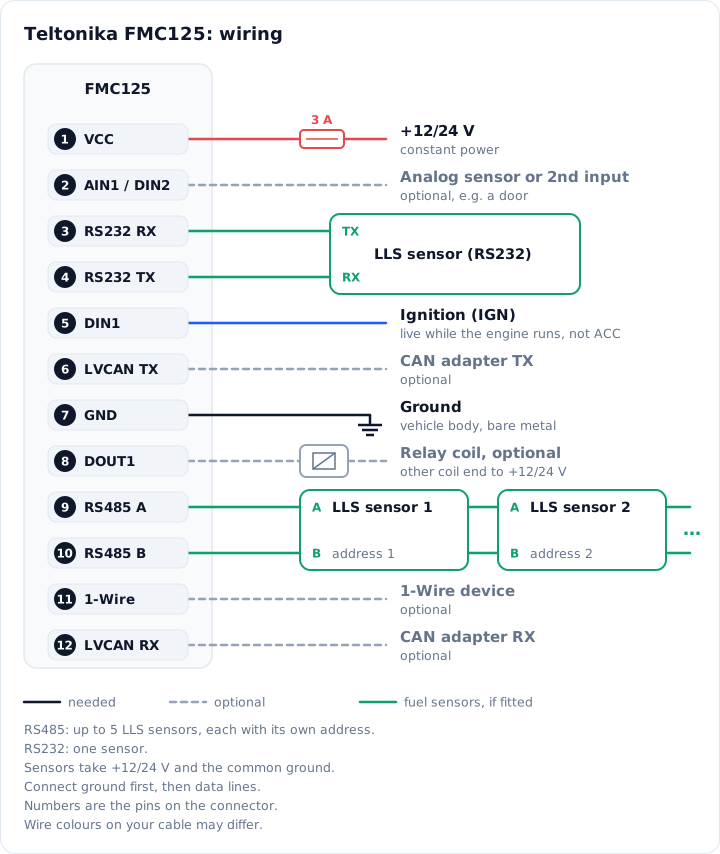
Pin table
| 1 | Power +10…30 V. Constant plus through a 3 A fuse. |
|---|---|
| 2 | AIN1 / DIN2: analog input 0–30 V or the second digital input. |
| 3 | RS232 RX. |
| 4 | RS232 TX. |
| 5 | DIN1, ignition. |
| 6 | TX for a CAN adapter (LV-CAN200, ALL-CAN300). |
| 7 | Ground (−). To the body, on bare metal without paint. |
| 8 | DOUT1, output for a relay (open collector). |
| 9 | RS485 A. |
| 10 | RS485 B. |
| 11 | 1-Wire data. |
| 12 | RX for a CAN adapter. |
Pin numbers are from Teltonika's FMC125 Quick Manual.
Check the ignition wire with a multimeter: the voltage must stay while the engine runs. An ACC wire (first key position) won't do.
The antennas are inside, so don't mount the tracker under metal. GPS will be weak there.
2Insert the SIM card
- Insert the SIM with the tracker powered off. The SIM 1 slot is the one closer to the board. The SIM needs mobile data on and the PIN request off.
- Connect the battery to the board.
3Point the tracker at Trekk
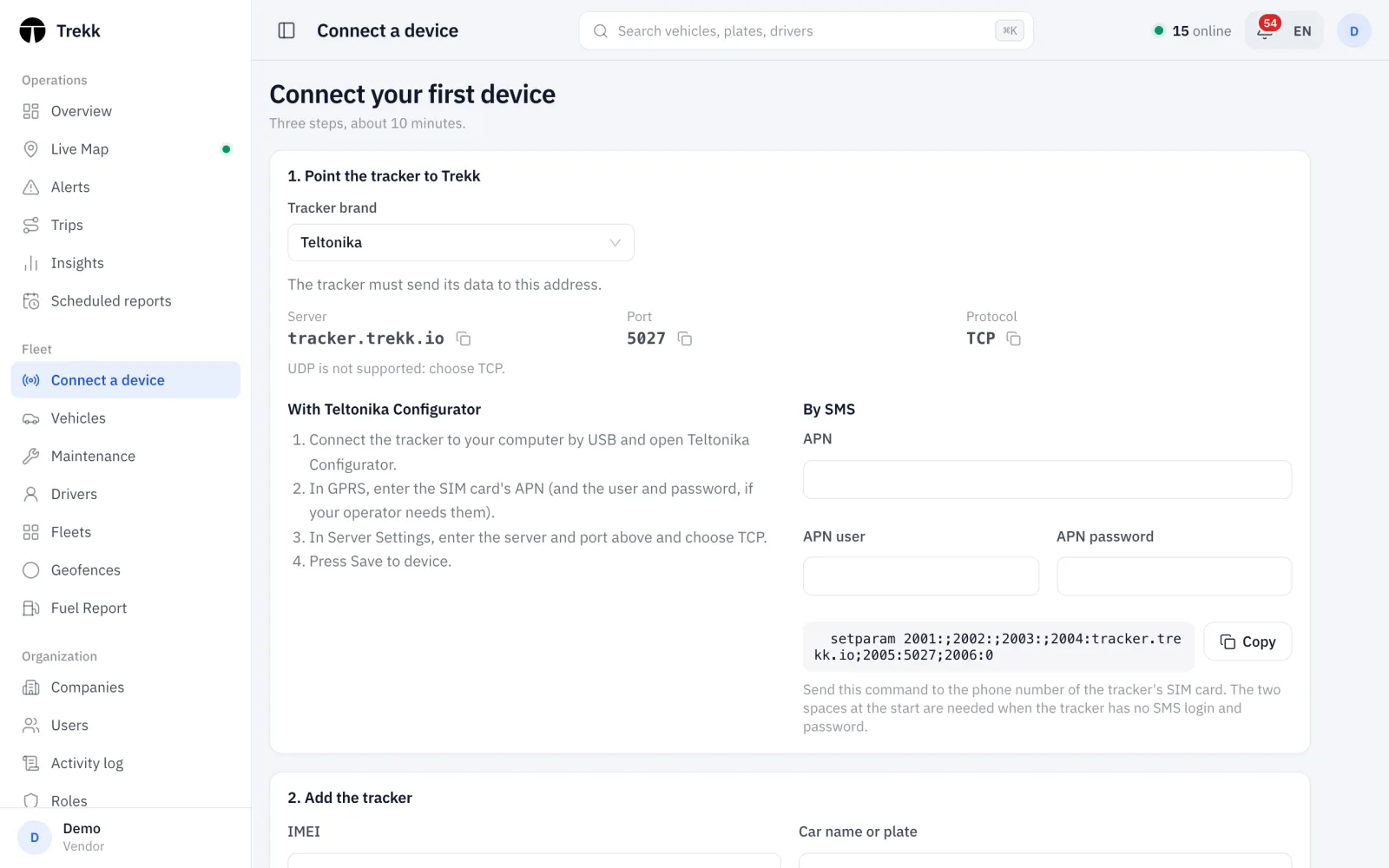
Fill in your operator's details, copy the command and send it by SMS to the tracker's SIM number.
setparam 2001:;2002:;2003:;2004:tracker.trekk.io;2005:5027;2006:0
The command starts with two spaces: that tells the tracker there's no SMS login and password.
Your operator knows the APN. It's usually on the operator's website or in a phone's mobile data settings.
- Connect the tracker to your computer by USB and open Teltonika Configurator.
- Teltonika Configurator runs on Windows only, and the Teltonika COM driver is for x64 only. On a Mac, set the tracker up by SMS.
- You can also connect without a cable, over Bluetooth. The default password is 5555.
- In GPRS, enter the SIM card's APN (and the user and password, if your operator needs them).
- In Server Settings on the same page: server
tracker.trekk.io, port5027, protocol TCP. - In System, under Ignition Source, choose the ignition input (more below, in "Ignition").
- Press Save to device.
4Add the tracker in Trekk
In the Trekk dashboard, open "Connect a device" and enter the IMEI (15 digits, on the tracker label and box) and the car name or plate. When the tracker sends data, the status changes to "Connected".
5Check the connection
If the car hasn't shown up within a few minutes, send the tracker the SMS getstatus with two spaces before the word. Paste the reply here and we'll show you what's wrong.
Once the car is connected, open it in Trekk on the Telemetry tab. You'll see the ignition, power voltage, number of satellites and signal level there.
What the lights mean
About the FMC125
The FMC125 works on 4G (LTE Cat 1) and switches to 2G where there's no 4G. The antennas are inside the case, and it has a backup battery and two SIM slots. What sets it apart from simpler trackers are the RS232 and RS485 ports for fuel level sensors (LLS) and other equipment. It also has 1-Wire, two digital inputs, an analog input and an output. Installers pick it for trucks, machinery and any vehicle where fuel needs watching.
Ignition
Trekk splits the route into trips and stops by the ignition. In Configurator, open System and set Ignition Source to DIN 1 if the ignition is on pin 5. Without an ignition wire, choose Power Voltage (the voltage is higher while the engine runs) or Accelerometer (by movement). Trips are more accurate with the wire.
Fuel level sensors (LLS)
One LLS sensor goes on RS232, and up to five on RS485, each with its own address. Connect the common ground first, then the data lines. Never put power on A/B (RS485) or TX/RX (RS232) and don't swap them: it can burn the tracker.
- In Configurator, open RS232\RS485 and set the mode to LLS. For RS485, enter the sensor addresses exactly as they are set in the sensors.
- In I/O, check that LLS 1 Fuel Level (and LLS 2, if there are two sensors) has priority Low, not None. With None the tracker doesn't send the value.
- Press Save to device.
- In Trekk, open the car and go to the Fuel tab. For the tank, choose the input "LLS sensor 1 (RS232/RS485)" and fill in the calibration table: raw value → litres. You can load the table from the sensor's software with Import CSV.
Under the input, Trekk shows the current value, like "Now: raw 2730 → 40 l". If it says "No value from this input yet", nothing is coming from the sensor. Trekk counts up to two tanks per car and adds them up.
Common questions
Is UDP supported?
No, only TCP. Choose TCP in the server settings.
Do I need to switch Codec 8 to Codec 8 Extended?
No. Trekk accepts both.
Is data lost when there is no connection?
No. The tracker keeps records in its memory and sends them when the connection is back.
I have a Mac and Configurator won't run.
Configurator runs on Windows only. Set the tracker up by SMS: everything Trekk needs takes one command.
The tracker is online, but the car isn't in Trekk.
Check the IMEI: send getimeiccid with two spaces at the start and compare it with the car's IMEI in Trekk. Trekk doesn't accept trackers that aren't added to a car.
Connect your first car for free
30 days, up to 20 cars. If something doesn't work, write to us and we'll help.